Web Development


Process
Preparing the Infrastructure
We create an isolated hosting environment for the project. The database, access rights and core security settings are defined at this stage. This groundwork keeps the whole project running reliably.
Code Management and Project Organization
We set up a dedicated repository for the client's website. The development cycle runs through this repository in a fully traceable way.
The panel, meanwhile, is installed from a central repository. Thanks to this architecture every client stays on the same up-to-date core, and every improvement made to the panel reaches everyone automatically.
Setting Up the Panel
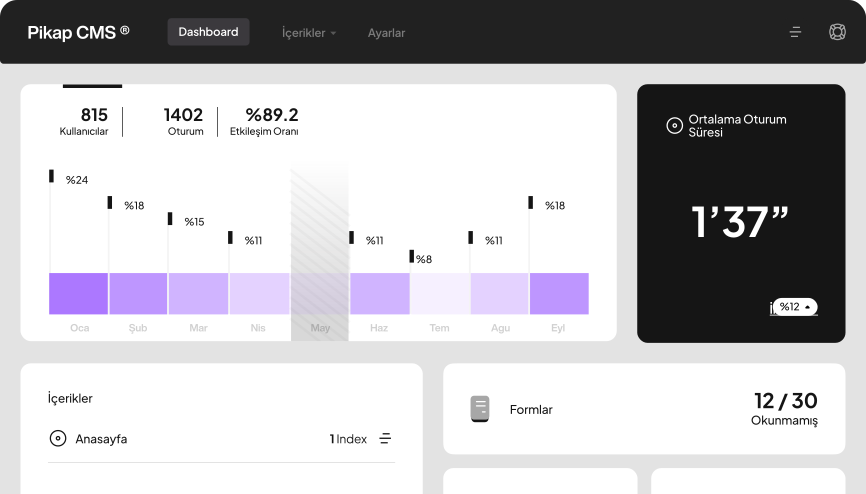
The panel is integrated on its own subdomain. The core is installed from the central panel repository and connected to the web project. Keeping the panel separate is a major advantage for both security and long-term maintainability.
Performance and Media Management
The CDN is configured so images and media assets load fast. The panel and the website stay stable even under heavy traffic.
Integrating the Design into the System
The design from Figma is implemented in the web repository. Interface components are aligned with the content models in the panel, so teams can create content without breaking the integrity of the design.
Testing and Validating the Publishing Flow
The publishing flow is tested against real scenarios. Content types, page behavior and performance are checked step by step.
Pre-Launch Checklist
SEO fields, redirects, URL structure and content integrity are verified one by one against a checklist, so the build goes live without risk.
Going Live
Once every step is complete, the project goes live in a controlled way. After launch, the panel keeps itself up to date thanks to its central architecture.
The Advantages of a Manageable Website
Having a site you can manage directly sets the pace of your digital operations. When content teams can publish what they need on time, brand communication stays more consistent. A publishing flow without delays lifts the performance of both campaigns and product launches.
This setup brings real benefits on the technical side too. Small updates no longer weigh on the development team, resources shift to the work that creates real value and teams become more efficient. A well-organized content model also lowers the error rate and makes operations more predictable.
In the long run, a manageable site is an investment that supports the brand's digital growth. Adding a new language, module or template doesn't strain the existing structure. Because the system stays ready to expand, decision-makers get a process that is more controlled in both time and cost.
Expert Article →Which Scenario Is Right for You?
Every brand has different needs, and the right CMS approach depends on where the project starts. That is why looking at the decision through three core scenarios offers a useful framework.
People reading this page usually also ask
Can the CMS integration be adapted to my existing site?
Ahmet Sağırlı Full Stack Developer
Yes. If your interface structure allows it, we can integrate the panel while keeping your design intact. The structure stays the same, while the content side becomes modern and manageable.
Will our content team find the panel hard to learn?
Ahmet Sağırlı Full Stack Developer
No. The panel is designed to be simple and clear, shaped around how your teams work. A short settling-in period is all it takes.
Do Pikap CMS updates reach us automatically?
Ahmet Sağırlı Full Stack Developer
Yes. Because the panel runs on a central core, the improvements and new features we build are rolled out to all our clients automatically.
Can the components our design team created be integrated into the system?
Ahmet Sağırlı Full Stack Developer
Yes. Figma designs are mapped to the content models in the panel, and every interface component is made available to your content teams.
Will it be easy to go multilingual later on?
Ahmet Sağırlı Full Stack Developer
Yes. The architecture is designed to support multiple languages. Adding a new language is practical and controlled for content teams.
When does the AI-assisted translation module pay off?
Ahmet Sağırlı Full Stack Developer
When you need to add a new language, create a landing page or translate large blocks of text, GPT, DeepL and industry-specific custom models are used together. The result is more consistent, on-brand translations.
Can our team manage SEO settings from the panel?
Ahmet Sağırlı Full Stack Developer
Yes. Meta fields, heading structures, schema data and URL patterns can all be updated easily from the panel, bringing content production and SEO together in one place.
What sets Pikap CMS apart from other content management systems?
Ahmet Sağırlı Full Stack Developer
Its SEO-friendly content architecture, modular structure, advanced component system and central update infrastructure are the clearest advantages. The panel is also designed to be simple and team-focused, which makes it far more comfortable to use.
How does it work when we need new page types or modules?
Ahmet Sağırlı Full Stack Developer
Because the architecture is modular, new page models or custom modules slot naturally into the system. This speeds things up for both publishing and development.
How do we benefit from the panel and the web project living in separate repositories?
Ahmet Sağırlı Full Stack Developer
The panel core stays up to date for every client. While your web project evolves independently, the panel keeps running modern, fast and sustainable.
Does this setup make collaboration between teams easier?
Ahmet Sağırlı Full Stack Developer
Yes. Content, design and development teams all work on the same model, so publishing runs more smoothly. Every team sees the same data structure and the process becomes more transparent.
How does this integration help with performance?
Ahmet Sağırlı Full Stack Developer
Thanks to CDN configuration, optimized components and a well-organized content model, pages load faster. This directly benefits the user experience and SEO.
Can we manage roles in the panel?
Ahmet Sağırlı Full Stack Developer
Yes. Different roles such as content team, editor and administrator can be defined, so each team's responsibilities are clear.
Does performance drop as the system grows?
Ahmet Sağırlı Full Stack Developer
No. Because the architecture is scalable, performance stays stable as you add new content, languages or modules.